
When No-Code Automation Stops Being the Cheap Option
Zapier is genuinely the right answer for a lot of workflows, and the wrong one for a few. Here's the payback calculation, the failure modes that actually force the switch, and the hybrid most people skip.

Nearly every integration project we're asked to quote starts the same way: "we've got it working in Zapier, but…" What follows is usually one of three complaints. The bill keeps climbing. Something failed silently and nobody noticed for a week. Or a step needs logic that no amount of filters and formatter steps will express.
We build custom integrations, so treat what follows accordingly. But we also talk clients out of this regularly, because a lot of Zapier setups should stay exactly where they are. Every article ranking for this question is written by an agency that sells custom builds or by an iPaaS vendor selling the tier above. Here's the version with the arithmetic shown.
The three real reasons people leave no-code
Not "scalability", which is what the vendor blogs say. In practice it's one of these, and they arrive in a fairly predictable order.
1. Cost crosses over
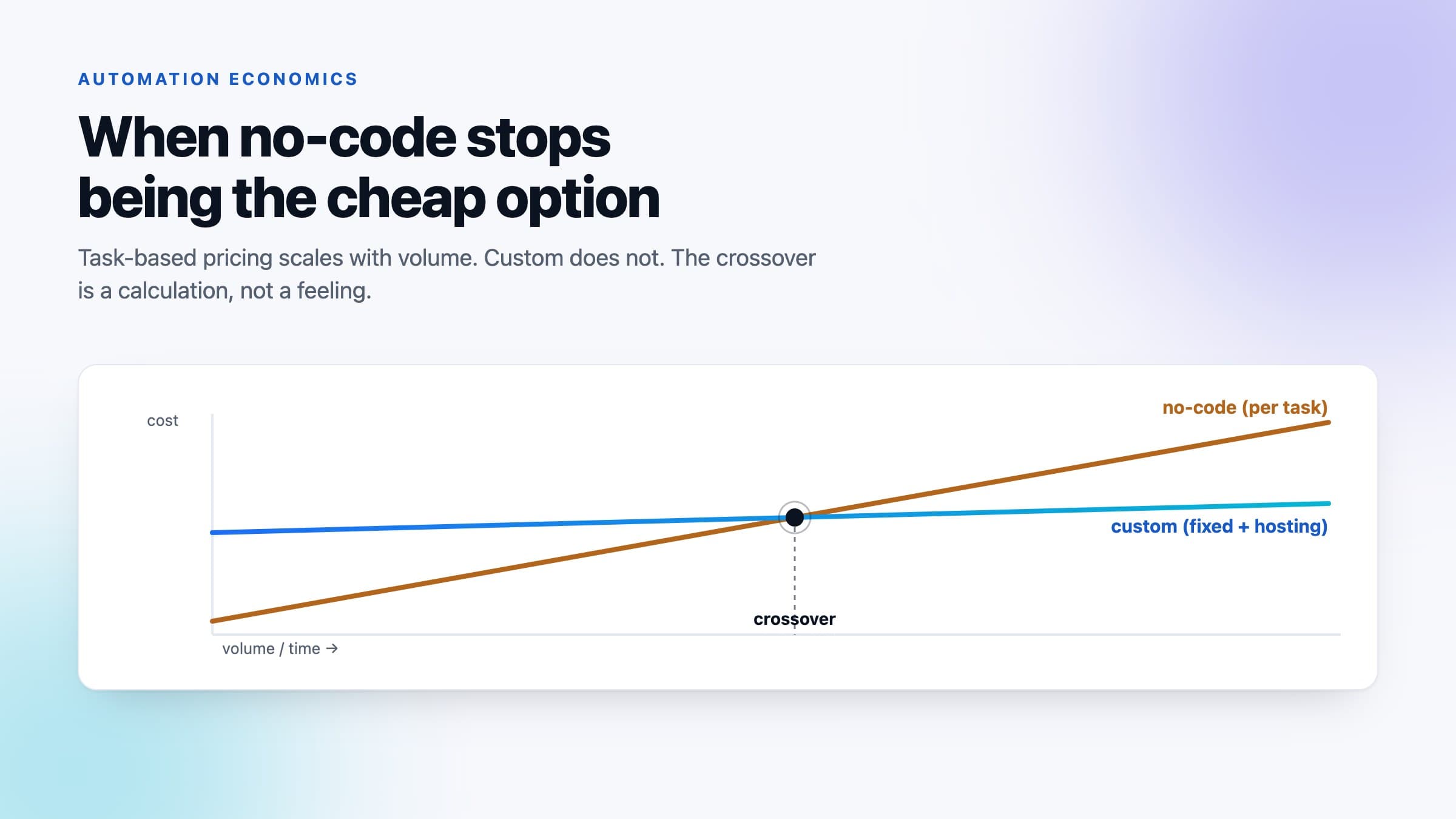
No-code platforms charge per task, run, or operation. Every step in a multi-step Zap consumes budget, so a five-step workflow processing 2,000 records a month isn't 2,000 tasks — it's closer to 10,000. Costs scale linearly with volume, forever.
A custom integration has the opposite shape: a large fixed build cost, then hosting that barely moves whether you process 1,000 records or 100,000. Two different curves, and they cross.
2. Silent failure becomes unacceptable
This is the one that actually forces the decision, and it's rarely in anyone's spreadsheet. A Zap that errors sends an email to whoever built it — often someone who has since left. Nobody notices until a customer asks why their order never reached the ERP.
The question isn't whether no-code can fail. Everything fails. It's whether a failure is visible, retryable, and owned. Off the shelf, you get notification. What you usually need is a dead-letter queue, idempotent retries, and an alert that reaches someone on shift.
3. The logic stops fitting
Filters and formatter steps cover a lot of ground. What they cover badly: multi-record transactions that must succeed or fail together, reconciliation against a system of record, anything needing state between runs, and rate-limit handling that's smarter than "try again later". When a workflow acquires a code step to do the real work, the platform has become an expensive scheduler.
Latency: what polling actually costs you
Worth being precise here, because most articles on this get it wrong in one direction or the other.
Zapier triggers are either instant (webhook-driven — the app pushes to Zapier the moment something happens) or polling (Zapier checks the app on a schedule). Per Zapier's own documentation, polling intervals run from 1 to 15 minutes depending on your plan — 15 minutes on the free plan, as low as 1–2 minutes on higher tiers. And the interval "cannot be shorter than the minimum for your plan or the minimum the app supports, whichever is longer."
That last clause is the part people miss. Paying for a faster plan doesn't help if the connected app only supports a slower poll. So "no-code is always 15 minutes behind" is wrong, and "just upgrade for real-time" is also wrong.
What matters is whether the delay costs you anything. A nightly accounting sync doesn't care. A lead-routing workflow where your competitor calls the prospect first cares enormously. If your integration is webhook-triggered and works today, latency is not your reason to move — don't let anyone sell you a rebuild on it.
The crossover, with the actual arithmetic
Do this on your own numbers rather than trusting anyone's example, including this one. You need four inputs:
- T — tasks per month. Not records: tasks. Count every step in every Zap, multiplied by how often it runs. Your platform's usage dashboard has this, and it's usually two to five times higher than people guess.
- C — your effective cost per task, from your current bill: total monthly platform spend divided by tasks used. Use your real plan from Zapier's pricing page, not the headline tier.
- B — the one-off build cost of the custom equivalent.
- H — monthly running cost of the custom version: hosting, monitoring, and a realistic maintenance allowance. Not zero. Something breaks upstream roughly twice a year, and an API you depend on gets a breaking version bump about as often.
Then: payback in months = B ÷ ((T × C) − H).
Three honest observations about that formula.
If (T × C) is smaller than H, the denominator is negative and there is no payback. Custom costs more forever. This is the situation most small no-code setups are in, and it's the reason we tell a lot of people to stay put.
If payback lands beyond about 24 months, treat it as a no. Your integration requirements will have changed by then, and a payback that distant is really a bet on the workflow being frozen — which it won't be.
If payback lands under 12 months, the cost case is already made, and everything else is upside.
What the calculation leaves out
Cost is the easiest input to measure and rarely the deciding one. Three things sit outside the formula and often outweigh it.
- Someone's time babysitting it. If a person spends two hours a month re-running failed Zaps and reconciling what didn't sync, that's a real, recurring cost missing from your platform bill. Price it at their actual salary and add it to the left side.
- The cost of a silent failure. Not the fixing — the consequence. A lost order, a customer who churned, an invoice that never went out. One serious incident can dwarf a year of platform fees. If you can't put a number on it, ask what happened the last time a sync broke and how long it took to notice.
- Who can change it. This cuts both ways, and it's the strongest argument for no-code. In Zapier your ops lead edits a workflow themselves. In a custom integration they file a ticket. That's a genuine loss of autonomy, and for teams that iterate on their processes weekly it can outweigh everything above.
When to stay on no-code — genuinely
We'd rather say this plainly than have you rebuild something that was working.
- Low, flat volume. If you're comfortably inside your plan's task allowance and volume isn't growing, the payback maths will never work. Stay.
- The workflow changes often. Frequent business-logic changes are exactly what no-code is for. Freezing that logic into a codebase makes iteration slower and more expensive.
- Non-critical paths. Internal notifications, spreadsheet housekeeping, Slack alerts. If a silent failure costs nothing, don't engineer for reliability you don't need.
- You're still figuring out the process. Building a custom integration for a workflow you'll redesign next quarter is the most expensive way to learn what you actually needed. Prototype in no-code first — that's a legitimate use of it, not a compromise.
When to move — genuinely
- Task consumption is growing faster than the business. If volume doubles and your bill triples, the pricing model is working against you and will keep doing so.
- A failure has real consequences and you found out late. This is the clearest signal. Not "it might fail" — it did, and nobody knew.
- Code steps are doing the real work. If the actual logic lives in scripts inside the platform, you already have a custom integration. You're just paying per execution to host it badly, without version control or tests.
- The data model has stopped fitting. Multi-record transactions, reconciliation, deduplication against a system of record. These need state and transactional guarantees that step-based tools don't provide.
The middle path most people skip
It isn't all or nothing, and the hybrid is usually the right answer for a year or two.
Keep the platform as the trigger and the glue — it's genuinely good at authentication, webhooks, and letting non-engineers wire things up. Move only the part that hurts into a single custom endpoint the Zap calls. One HTTP step replacing eight brittle ones cuts task consumption, puts the complicated logic under version control with proper error handling, and leaves your ops team able to change the surrounding flow themselves.
That's a fraction of the cost of a full rebuild, and it's reversible. We've left clients on that arrangement for years because nothing forced the next step.
The short version
- Run the payback calculation on your own task counts. Under 12 months, the case is made. Over 24, don't.
- Cost is rarely the real reason. Silent failures and logic that no longer fits are what actually force the move.
- Latency is a weaker argument than it sounds. Polling is 1–15 minutes depending on plan and app, and webhook triggers are already instant.
- Try the hybrid first. One custom endpoint behind a no-code trigger solves most of this at a fraction of the cost.
Not sure which side of the line you're on? Send us your monthly task count, what your workflows actually do, and what happened the last time one failed. That's enough for a straight answer — and if the answer is "stay on Zapier", we'll say so and tell you why. Have a look at how we approach integration work, or read what actually breaks in CRM integrations.
Frequently asked questions
When should I move from Zapier to a custom integration?
When one of three things is true: task consumption is growing faster than the business, a failure had real consequences and nobody noticed for days, or the actual logic already lives in code steps inside the platform. That last one means you have a custom integration already and are paying per execution to host it without version control or tests. Cost alone rarely forces the move.
How do I calculate the payback on a custom integration?
Payback in months equals the build cost divided by monthly platform spend minus the custom version's monthly running cost. Use tasks rather than records for the volume, because every step in a multi-step workflow consumes budget. If the running cost of custom exceeds your current platform spend there is no payback at all. Under 12 months the case is made, and beyond about 24 months treat it as a no, since your requirements will have changed by then.
How slow is Zapier really?
Less slow than the rebuild pitch suggests. Zapier triggers are either instant, meaning webhook-driven, or polling. Zapier's documentation puts polling intervals at 1 to 15 minutes depending on plan, with 15 minutes on the free plan, and notes that the interval cannot be shorter than the minimum for your plan or the minimum the connected app supports, whichever is longer. If your integration is webhook-triggered and working, latency is not a reason to rebuild it.
When should I stay on no-code?
When volume is low and flat, when the workflow changes often, when a silent failure costs nothing, or when you are still figuring out the process. Frequent business-logic changes are exactly what no-code is for, and freezing that logic into a codebase makes iteration slower and more expensive. Prototyping in no-code before committing to a build is a legitimate use of it, not a compromise.
What is the hybrid approach to no-code automation?
Keep the platform as the trigger and the glue, since it handles authentication and webhooks well and lets non-engineers wire things up, and move only the painful part into a single custom endpoint the workflow calls. One HTTP step replacing eight brittle ones cuts task consumption, puts the complicated logic under version control with real error handling, and leaves your operations team able to change the surrounding flow themselves. It costs a fraction of a full rebuild and it is reversible.
What does a no-code cost comparison usually leave out?
Three things, and they often outweigh the platform bill. Someone's time re-running failed automations and reconciling what did not sync. The consequence of a silent failure, meaning the lost order or the invoice that never went out rather than the cost of fixing it. And the autonomy you give up, because in a no-code tool your operations lead edits the workflow themselves while in a custom integration they file a ticket.
Related Posts
AI Agent Cost Per Task: Why Your Bill Is a Reliability Problem
Token cost grows with the square of the steps, the chance of needing another attempt grows exponentially with them, and the human who cleans up afterwards costs more than both. Here is the model we use to decide whether an agent is viable, with the arithmetic shown.
AI Phone Agents: What They Can Actually Handle, What a Minute Costs, and the 200ms Problem
Human turn-taking runs at 0–200 ms; the best agents manage 500. A well-built minute costs three to seven cents before margin. Gartner says cost per resolution passes $3 by 2030. What to let it answer, what never to, and how we build one.
AI or Rule-Based Chatbot? The Answer Is Which Question You're Answering
Everyone says "hybrid" and stops there. The useful part is deciding which questions go down which path — and the two technologies fail in completely different ways.